
Transform your technical documentation with ease! This powerful tool converts Markdown files
containing Mermaid diagrams into professional DOCX documents and PNG images – no programming skills
required!
🎯 What This Tool Does
If you create technical documentation, process flows, or architecture diagrams, this tool is for you. It
automatically:
- ✅ Converts Mermaid diagrams in Markdown files to PNG images
- ✅ Generates professional Microsoft Word documents (DOCX)
- ✅ Works with all Mermaid diagram types (flowcharts, sequence diagrams, class diagrams, etc.)
- ✅ Provides both graphical interface and simple click-to-run options
📥 Get Started in 2 Minutes
Choose the option that works best for you:
Download Windows Version
or
View Source Code
Windows version includes everything you need – just download, unzip, and run!
👨💻 For Non-Technical Users
Option 1: Simple Windows Application
- Download the Windows package from the link above
- Unzip the downloaded file to any folder
- Double-click “Mermaid Chart Generator.exe”
- Select your Markdown file and output folder
- Click “Generate DOCX + Charts”
That’s it! Your document and images will be created automatically.
📋 What You Need in Your Markdown File
Simply include Mermaid diagrams like this in your Markdown file:
flowchart TD
Start[Process Start] –> Input[Get User Input]
Input –> Validate{Validate}
Validate –>|Valid| Process[Process Data]
Validate –>|Invalid| Error[Show Error]
Process –> Output[Generate Output]
Output –> End[Complete]
“`
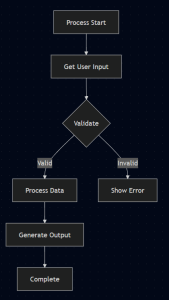
The tool will automatically find and convert all these diagrams!
🌟 Key Features
- Easy-to-Use Interface – No command line needed
- Multiple Diagram Support – Flowcharts, sequence diagrams, class diagrams, and more
- Professional Output – Clean DOCX documents with embedded images
- Standalone Operation – No internet connection required
- Cross-Platform – Works on Windows, Mac, and Linux
🔧 System Requirements
- Windows: Windows 10 or later
- Mac/Linux: Python 3.7+ (installation guide included)
- Disk Space: Approximately 50MB
- Permissions: Standard user permissions
installation instructions are provided in the documentation.
📚 Perfect For
- Technical documentation
- Process flow diagrams
- Software architecture diagrams
- Project planning and workflows
- Academic papers and reports
- Business process documentation
🚀 Ready to Get Started?
Download now and transform your documentation workflow!
Download for Windows
View GitHub Project
💬 Need help? Check the comprehensive documentation included in the download or visit the
GitHub page for support.
 JimmyIoT