
This blog is to cover some common errors if you are using the VirtualBox and install the Ubuntu on the system.
Fix for ‘Username Is Not in the Sudoers File. This Incident Will Be Reported’
In Linux, there are certain commands that can only be executed by the root user. By default, the root user has unrestricted access to all commands and system resources.
However, it is risky to perform sensitive tasks without any restrictions. This is because a deliberate or accidental mistake can potentially cause the entire system to break. Therefore, Linux promotes the use of the ‘sudo’ command. This command allows a regular user to temporarily acquire the privileges of the root user in order to carry out administrative tasks. When working with ‘sudo’, you may encounter the error message ‘Username is not in the sudoers file. This incident will be reported.
In this tutorial, we’ll discuss the different approaches used to fix this error. For example, the user name is “demo”. It shows the error that this username is not in the sudoers file.

How to fix : Adding the Username to the Sudoers File
Our main goal here is to add the user directly to the sudoers file. So we need to switch to the root user, since demo can’t perform any administrative tasks:
$ su root
Password:
Once we’ve made the switch, we’ll edit the sudoers file using vim This is a text editor that allows us to edit files from the command line:
# nano /etc/sudoers
Now the sudoers file is ready for editing.
I refer to the URL (https://www.baeldung.com/linux/username-not-in-sudoers-file)

Add the username (user, demo) in the sudoers file.
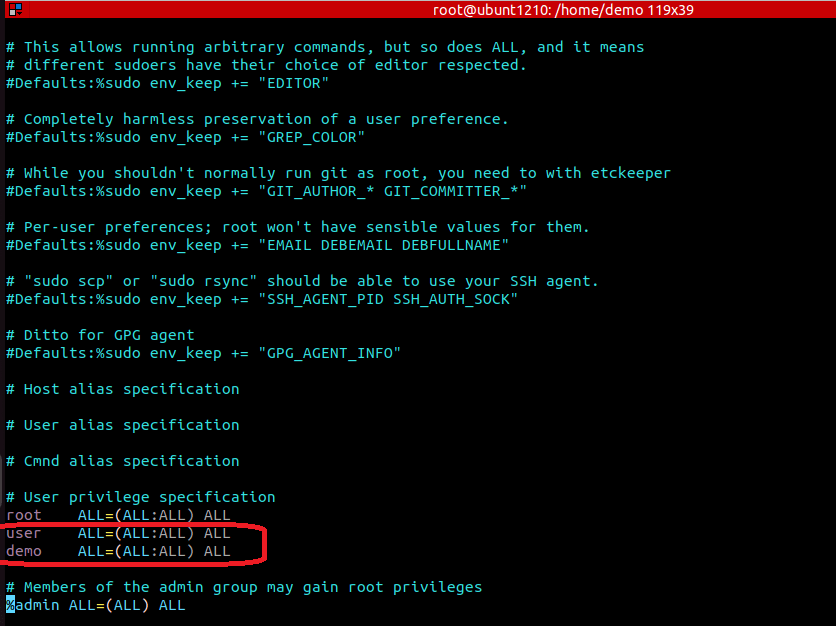
Now, since we’re operating in Debian, let’s add our user to the sudo group:

usermod -aG sudo demo
Here, the usermod command allows us to modify our user’s attributes. In particular, we use the -G option to declare that we’d like to update the group information for our user demo. Also, the -a option makes certain that other groups associated with this user aren’t deleted in the process. As a result, demo can now perform administrative tasks with sudo
 JimmyIoT